
Sums done by hand at the end of the month.
Exports from every platform.
One file from Airbnb, another from Booking and direct bookings on the side, all to be pieced together in a spreadsheet.
Commissions and fees mixed together.
Hard to know how much was really left from each stay.
Owners kept waiting.
Every request for the figures is another afternoon lost.
How it works.
Bookings come in automatically
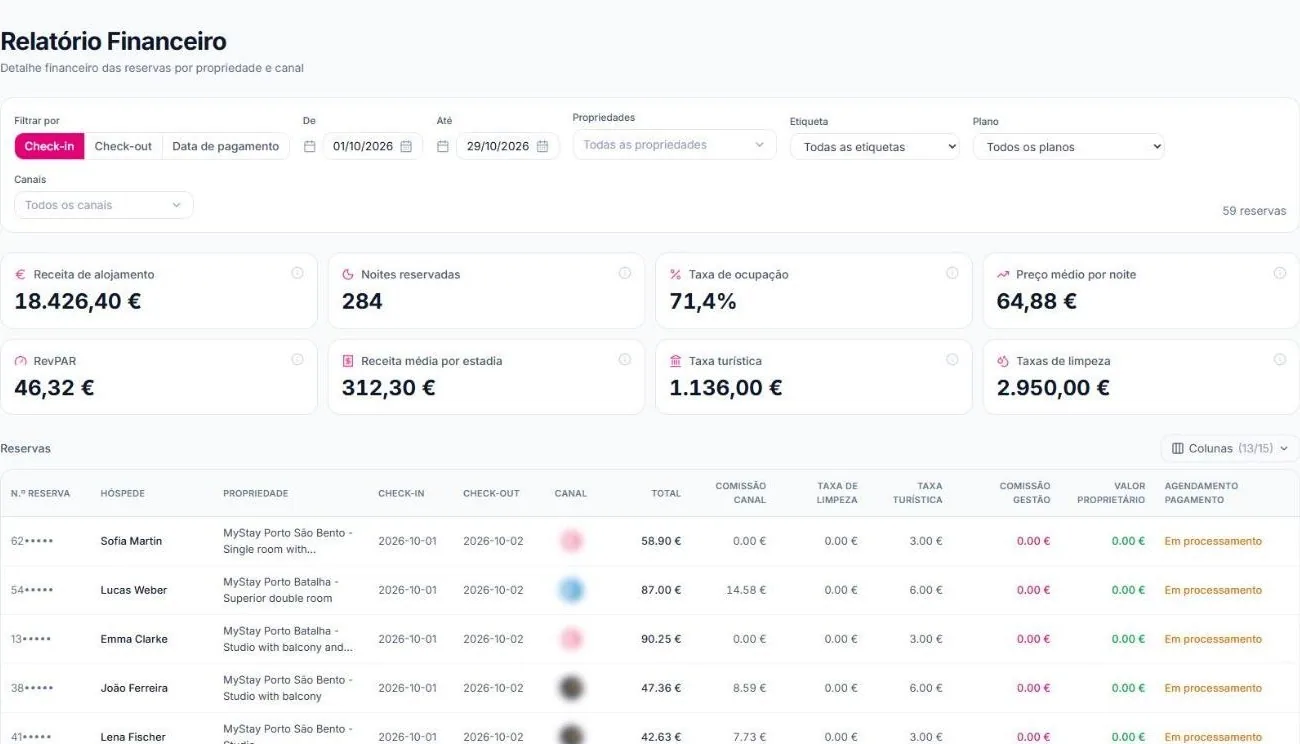
Every booking, from every channel and your website, goes into the same report.
Filter however you need
By check-in, check-out or payment date, by property, tag, plan and channel.
Read the numbers
The indicators at the top and each booking's detail below, with the columns you choose.
What's included.
Key indicators
Accommodation revenue, nights booked, occupancy rate, average nightly rate, RevPAR and average revenue per stay.
Tourist tax and cleaning
The period's totals, ready to hand over and to invoice.
Detail per booking
Total, channel commission, cleaning fee, tourist tax, management commission and owner's share.
Custom columns
Show only the columns you need.
By channel and by property
Compare what each platform and each property earns.
Invoicing with Moloni
Invoicing add-on connected to Moloni, for €25 + VAT a month.
Numbers you can trust.
- Every figure comes from the booking, not from copying by hand
- Commissions are kept separate from revenue
- Tourist tax is calculated per booking
- The same filters work for each owner
- Operations report on Business
Frequently asked questions.
Are the reports on the free plan?
Yes. Financial reports are on every plan, including Host.
Do bookings from every channel come in?
Yes. Airbnb, Booking, the other channels and your direct booking website.
Can I filter by owner?
You can filter by property and by tag, for example one tag per owner.
Is invoicing included?
Invoicing with Moloni is an add-on at €25 + VAT a month.
And the tourist tax?
The report shows the tourist tax for each booking and the period total. Automatic tax calculation is on Pro and Business.